NewStruXure is now on the App Store.Find us in the App Store →

Built for builders

Faster Closeout with powerful Punchlist

StruXure.co's rapid capture creates punch items fast—so you spend less time documenting and more time closing issues.

FieldOfficePlan sheetPunch listCloseout3124
FieldOfficePlan sheetPunch list3124
ProjectStruXure.co
Punch list
A-101
  1. Simplified
  2. Drop Pins
  3. Organized
  4. Audit

Simplify Punchlist Management with Purpose Built Field Tools

Punchlist management simplified. Create, distribute, track, and follow-up, with mobile-first native iOS and Android capabilities. Punchlist logs maintain visibility, so every stakeholder knows where they stand.

Request a demo
  1. Photo, on or offlineNew punch item

    Simplified

    Rapid capture accelerates punch list creation, whether on or offline.

  2. Pinned to the plan

    Drop Pins

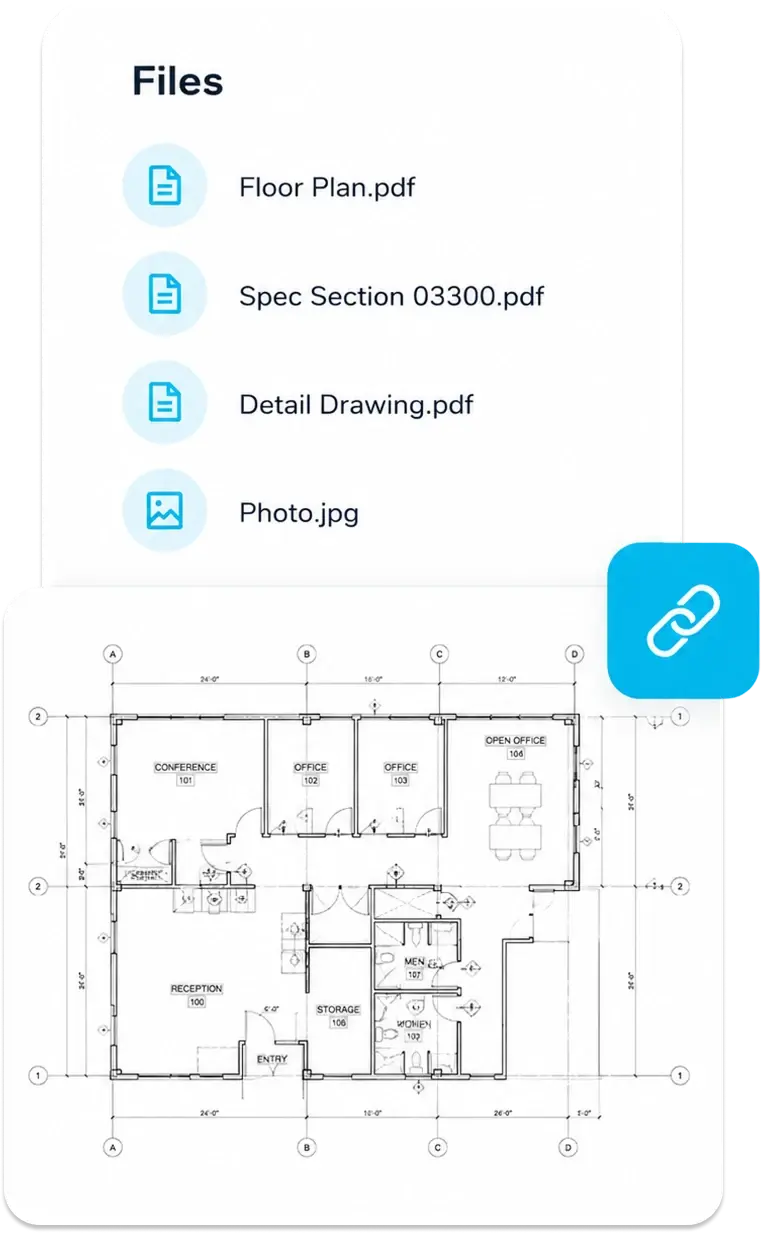
    Drop pins and link images, drawings and punch items directly on plan sheets.

  3. Punch listAssigned sub, due date

    Organized

    Log punch items, assign responsibility, set deadlines, and monitor status.

  4. All itemsFilter by statusOpen items

    Audit

    A complete history for closeout clarity. Quick filter by status and track every item to resolution.

Drop pins

Link Punch Items directly to Plans for clear context and faster resolution

Link photos to drawings to reduce errors and improve collaboration. With a single point of truth your team can stay informed and execute faster.

  • Align teams & reduce errors with automated distribution lists
  • Resolve issues faster with all the information at your fingertips
  • Speed up creation with voice dictation
Request a Demo
StruXure.coA Files card listing Floor Plan, Spec Section, Detail Drawing and Photo attachments, linked to the plan.
1Detail 1 / A-101
Pin on the planPhotoVoice dictationSubcontractor

Progress tracking

From Start -> Finish; Track every Punch Item so nothing slips through the cracks

Automated reminders keep the team on top of deadlines. Monitor progress, responsible party, and priority. Automated logging tracks every update to create a complete & auditable communication history.

Request a Demo
2Detail 2 / A-101
Overdue itemAutomatic reminderResponsible sub

Communicate

Document issues when identified. Close Punchlist items faster

Address issues when they are identified. With our native mobile app (iOS & Android), you can document issues on the spot reducing downtime and accelerating resolution. Responsible parties do not need to log in to respond. They can directly reply via email without training or extra steps.

  • Accelerate timelines by closing Punch items faster.
  • Remove friction from response process
  • Speed up response with intuitive, email-based communication
Request a Demo
3Detail 3 / A-101
Super, on the spotCrackIOS & AndroidSub replies by email

Ready to start?

If you have questions or are ready to get started, contact us today to discuss how we can help turn your vision into reality.

Frequently Asked Questions

Why use StruXure.co's Punch list Software?

Punch list software gives contractors a clear, current record of work discrepancies—what’s wrong, who’s fixing it, and when it’s due. It also tracks the status of open items so teams can stay on top of corrections. Items can be created in the field, right where the issue is identified with our companion iOS or Android apps. Users can sort by status and keep a live history of every action on each issue. StruXure.co’s punch list tools make that process fast, complete, and accurate.

What are Punch lists?

A punch list records gaps between what the contract documents require and what was actually delivered. They usually appears near the end of a project so those issues can be corrected before closeout. Typical items include work that is wrong, missing, or below standard—whether from the contractor or a subcontractor. For example, installed materials that don’t match the specs belong on the punch list. Paint that was smudged, doors installed backwards or floor tile with joints wider than the specified gap. In short, anything that fails to meet the contract documents can become a punch list item.

Who uses Punch lists?

Punch lists are used by nearly every party on a construction project. The owner or the owner’s design team usually starts the project punch list. General contractors and construction managers then assign that list to subcontractors on the job.

Contractors of every type may also keep punch lists to manage quality on their scope of work. The tool is effective because contractors typically have to close out punch items before they get paid and contingency is released.

What are the benefits of using StruXure.co's Punch list software?

StruXure.co's Punchlist software keeps information organized and accessible. It brings transparency and accountability to the jobsite, showing who is responsible for resolving an issue and its status.

Automatic reminders prevent delays.
With the drop pin / hyperlink feature, users can drag and drop items directly on digital plans for specificity. They can also link to RFIs, specifications, and photos so the requirements are clear and accessible.

StruXure.co software records history for accountability and provides end-of-project reporting for improvement.

Does StruXure.co follow industry standards for Punch Lists?

Yes, StruXure.co's Punch list software follows industry-standards for creation, distribution, tracking, and assigning with a full auditable history.

Can StruXure.co's Punch list software integrate with other APIs / systems?

Yes, StruXure.co supports most integration standards including REST, web-services, and MCP (for AI).

Explore all that StruXure.co has to offer

The StruXure.co platform has a variety of features and capabilities built for builders. See them all today!

See the Full Platform