





Managing project specifications is one of the most time-consuming parts of preconstruction. It is also error-prone when done by hand.
Some construction teams still handle spec books the way they always have. A large PDF arrives in someone's inbox. They manually split it up, rename files, and try to organize sections. They hope the rest of the team can find what they need when they need it. On a project with 200 or 300 spec sections, that process can take hours. This time and effort spent occurs before any revisions come in, forcing the whole process to start over. StruXure.co addresses these issues and more.
The Problem(s) With Manual Spec Management
Spec books are critical construction documents. Following the specifications or having proper documentation noting a deviation can be the difference between a paid change order or costly rework (margin erosion).
A typical commercial project spec book can be hundreds of pages long across multiple divisions. Layer in incomplete designs, changing preferences, numerous revisions, and supply chain issues, and it's clear that that diligent management of this process is paramount. While the process is the same across projects, the devil is in the details. Those pages include section codes, titles, cover pages, general conditions, and technical specifications, all combined in a single file. When teams handle this manually, several things can go wrong:
- Sections get mislabeled or missed completely.
- Files are saved in inconsistent formats or locations.
- Revisions cause confusion about which version is current.
- Finding a specific section during construction means digging through folders or searching a disorganized list.
The cost to your team (and company) is not just time. The friction includes coordination issues that arise later when submittals, RFIs, and procurement decisions depend on specifications that are hard to find or poorly organized.
The StruXure.co Way - Spec Book Import
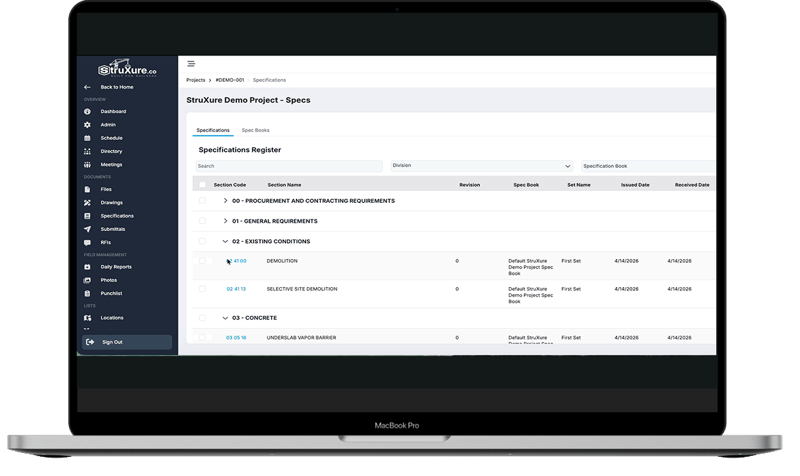
StruXure.co's specification import process turns a raw spec book PDF into a clean, searchable, organized register with minimal manual work from your team. Here is how it works.
First, Upload Your Spec Book
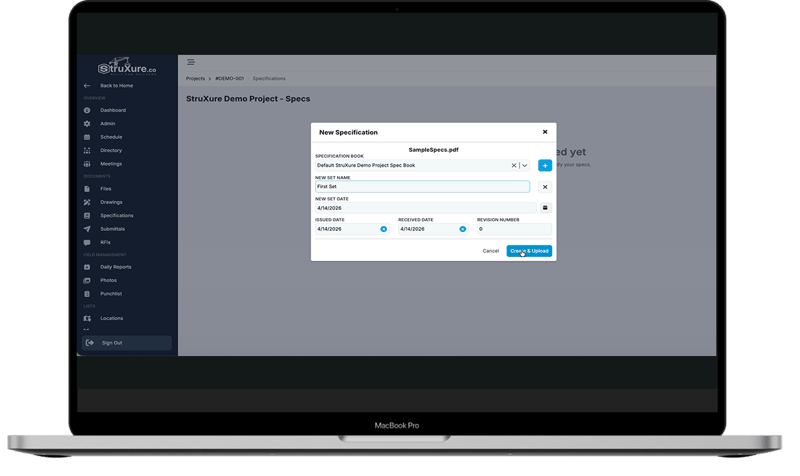
From the Specifications page in StruXure.co, you simply upload your spec book PDF. From there, you will name it, set key dates, and assign a revision number. Because StruXure.co supports multiple spec books for a single project, naming conventions matter - especially when later revisions come in.
Second, Automatic Extraction
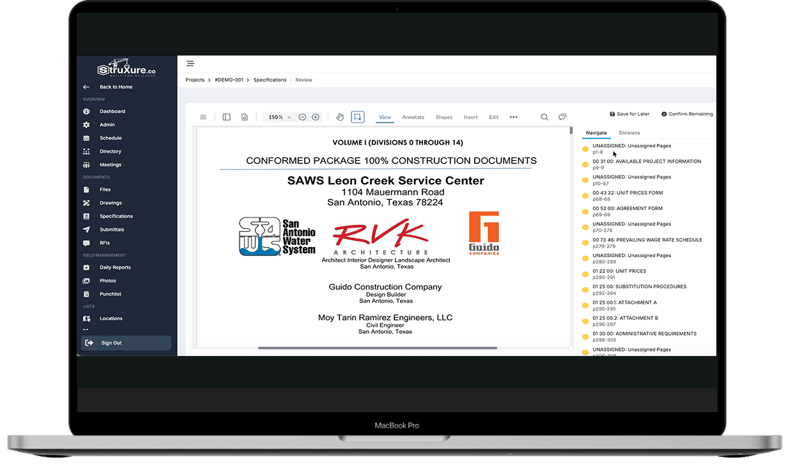
As soon as you have uploaded your spec book, StruXure.co starts extracting the critical information you need for your spec book. The platform uses text extraction and optical character recognition (OCR) to read through the entire document and identify all necessary information. StruXure.co pulls section codes, titles, and divisions directly from the file's content. For large, complex spec books, getting the initial extraction correct is crucial. Accuracy here reduces the review work.
Third, Your Team Reviews
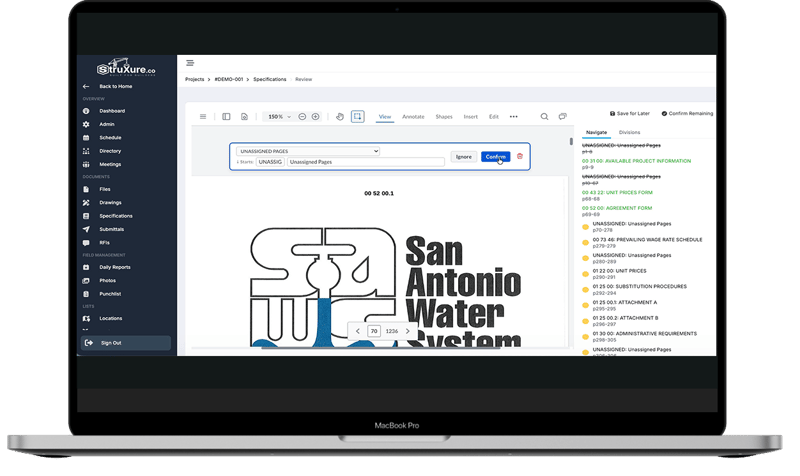
With StruXure.co, your team is always in control. After extraction, users are guided through a page-by-page review inside an intuitive workflow. Every page in the spec book is assigned to a section or left unassigned. Unassigned pages are not lost; they are simply set aside. Cover pages, front matter, and pages that do not belong in the spec register stay out. During the review, your team may:
- Confirm sections that were correctly identified.
- Update section codes and titles as needed.
- Delete sections that do not apply.
- Create new sections if something needs to be added.
To ensure your team always knows what is happening, the full spec book is visible on the side of the screen throughout the process. Navigation is simple. Confirmed sections are highlighted in green, reviewed pages are crossed out, and the status of the whole document is clear at a glance.
Fourth, Publish and Build the Register
Once your review is complete, simply select 'Publish.' StruXure.co takes that action as the signal to split the full PDF into individual section files, one file per spec section, just like you would do manually before. Our software quickly builds out the spec register with each section code, title, and revision number, all of which are populated automatically.
StruXure.co delivers you an organized register that your whole team can access immediately.
Fifth, Search, Filter, and Find
Once the register is published, navigation is simple. Users with granted permissions may expand divisions, search by section code or title, and filter across the register to find exactly what they need—saving time and effort. Simply click into any section, it will open the PDF directly at that location.
When a new revision is submitted, the process repeats. Upload the revised spec book, run it through the same review, publish it, and register the updates accordingly. With revision tracking intact, your team always knows which version they are looking at.
Why This Matters on a Real Project
The value of this process is not just speed, although the time savings are real. It is consistency.
When every project follows the same spec import process, every team member knows where to find specifications, how they are organized, and which version is current. That consistency reduces the friction that slows submittals, procurement, and subcontractor coordination.
It also creates a foundation for the rest of the project workflow. In StruXure.co, specifications are the starting point for submittals, so getting the register right at the beginning pays off throughout the entire project lifecycle.
Want to See It in Action?
If your team is managing spec books manually and you want to see how StruXure.co handles the process, reach out to the StruXure.co team directly. They can walk you through a live demo of a real project and show you exactly how the import process works, from upload to publication in the register. You can also watch a short preview of StruXure.co's specification management, here.
.png?height=230&name=image%20(391).png)